
Many people say they want a website.
A business owner may say, “I need a website for my company.”
A school may decide it needs an online presence.
A church may want to publish its services, announcements and events online.
A professional may want a portfolio.
A blogger may want a place to publish articles without depending entirely on social media.
The first step in owning a website, however, is not choosing colours, designing a homepage or deciding whether the buttons should be rounded.
Before a website can be designed and developed, it needs a digital foundation.
That foundation consists of several important parts that work together: a domain name, a domain extension, a registrar, web hosting and DNS configuration.
Understanding these components before purchasing a website can save you from confusion, unnecessary costs and the common mistake of believing that buying a domain automatically means you own a complete website.
It does not.
A domain is only the beginning.
Phase One: Building the Digital Foundation
The first phase of owning a website is establishing the infrastructure that allows your website to exist online.
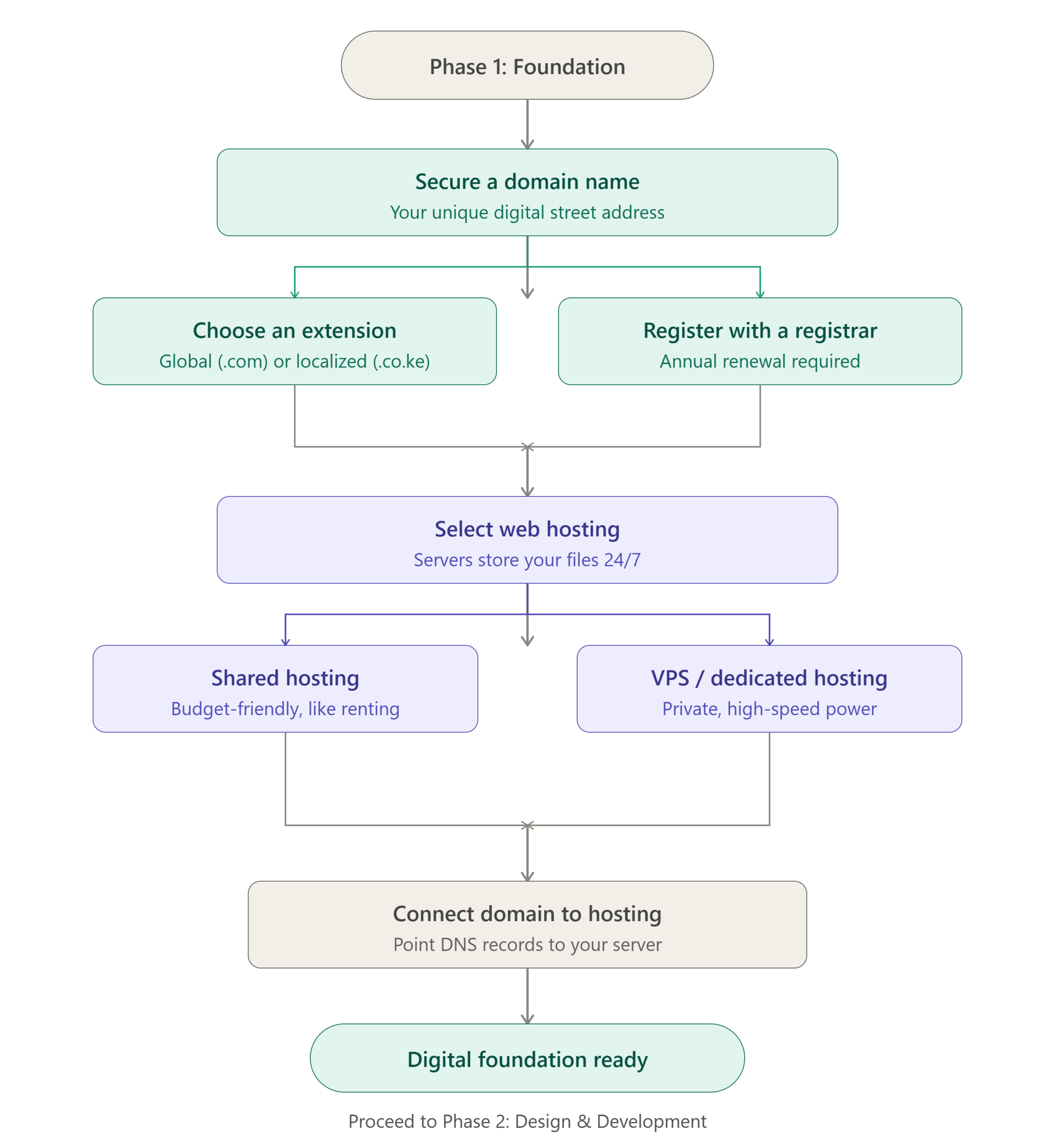
This is the stage represented in the flowchart, beginning with securing a domain name and ending with connecting that domain to a hosting server.
Once this foundation is ready, the actual design and development of the website can begin.
Think of it like constructing a physical business premises.
Before decorating the interior, installing furniture and welcoming customers, you first need land, an address and a building.
In the digital world, the domain is your address, hosting is where your website lives and DNS helps visitors find the correct location.
Step One: Secure a Domain Name
A domain name is the unique address people use to find your website online.
For example, a business might use a domain based on its name, while a school, organization or individual might choose a domain that reflects its identity or purpose.
When someone types your domain into a browser, the browser needs to locate the server where your website is stored.
That is what eventually allows the visitor to see your homepage, read your content, browse your services and contact you.
Without a domain name, people would have to access your website using complicated technical server addresses.
Imagine telling a customer:
“Visit 192.168.45.27, then add a special port number.”
Most customers would probably decide to visit your competitor instead.
A domain name gives your online presence a human-friendly identity.
Choosing the Right Domain Name
Your domain name is part of your brand.
It may appear on:
- business cards,
- posters,
- social media profiles,
- invoices,
- email addresses,
- advertisements.
For that reason, your domain should be chosen carefully.
A good domain name should generally be easy to remember, easy to spell and reasonably easy to communicate verbally.
If customers constantly ask you to repeat the name or clarify whether a word is spelled with one letter or three, the domain may create unnecessary confusion.
A domain should also be relevant to your business or purpose.
A company called Nairobi Green Supplies, for example, may choose a domain related to its business name rather than a completely unrelated phrase that customers will not associate with it.
There are exceptions, especially for brands with unique names, but clarity is generally useful.
Step Two: Choose a Domain Extension
A domain name is made up of different parts.
For example, in a domain such as:
example.co.ke
“example” is the main domain name, while “.co.ke” is the domain extension.
The extension can communicate something about the website’s identity, location or purpose.
Some extensions are associated with particular countries, while others are commonly used for particular types of organizations.
.com
The .com extension is one of the most widely recognized domain extensions in the world.
It is commonly used by:
- businesses,
- commercial brands,
- online services,
- international organizations.
A .com domain can be particularly useful for a business that targets an international audience or wants a globally familiar identity.
.co.ke
The .co.ke extension is commonly associated with businesses operating in Kenya.
For a Kenyan company targeting Kenyan customers, it can immediately communicate a local connection.
A customer searching for a Kenyan business may naturally feel familiar with a .co.ke address.
.org
The .org extension is widely associated with organizations, nonprofits and community-based initiatives, although its use is not limited exclusively to those groups.
.ac.ke
Educational institutions in Kenya may use education-related domain extensions such as .ac.ke, depending on their eligibility and registration requirements.
The important point is that the domain extension should make sense for your identity, audience and purpose.
A domain extension is not merely decoration at the end of your website address.
It can form part of your brand.
Global or Local?
One question many website owners face is whether they should choose a globally recognized extension or one connected to their country.
There is no single answer for every business.
A company serving primarily Kenyan customers may find a local domain useful.
A business planning to serve customers across multiple countries may prefer a global extension.
Some businesses register more than one domain to protect their brand.
For example, a company may own both a .com and a .co.ke version of its name and direct one of them to the main website.
This can help prevent confusion and reduce the possibility of someone else registering a similar domain.
Step Three: Register the Domain With a Registrar
A domain name must be registered through a domain registrar.
A registrar is the company or service that handles the registration of your domain with the relevant domain registry.
When you register a domain, you generally pay for the right to use that domain for a specific period.
This is important because a domain is not usually purchased permanently in the same way that you might buy a physical object.
You register it for a period, often one year or more, and renew it before it expires.
Domain Renewal Is Important
One of the easiest ways to lose control of a website is to forget to renew the domain.
A domain that expires can eventually become available for someone else to register, depending on the extension and the applicable renewal and redemption periods.
This can create serious problems for a business.
Imagine printing thousands of business cards, signs and advertisements containing your website address, only to discover that the domain has expired and someone else now controls it.
The website may disappear.
Email addresses connected to the domain may stop working.
Customers may be unable to reach you.
For this reason, domain renewal should be treated as an important business responsibility.
Some registrars provide automatic renewal options, but website owners should still ensure that payment details and contact information remain up to date.
You Should Know Who Owns Your Domain
This is one of the most important things to understand before owning a website.
If a web developer helps you register your domain, make sure you know:
- who the domain is registered under,
- which email address controls the account,
- who can renew it,
- who has access to the registrar account.
Ideally, the domain should be registered under your name or your business’s details.
A developer may manage the domain on your behalf, but the business owner should understand who legally and practically controls it.
Losing access to your own domain can be extremely frustrating.
It is similar to owning a shop but discovering that somebody else controls the keys, the lease documents and the address.
Step Four: Select Web Hosting
Once you have a domain, you need somewhere to store your website.
That is where web hosting comes in.
Web hosting provides the server infrastructure where your website files, databases, images and other resources are stored.
When someone visits your domain, the hosting server delivers the necessary files to their browser.
The result is the website they see on their screen.
A simple way to understand the difference is this:
Your domain is the address.
Your hosting is the property where your website lives.
Your website itself is the building, furniture, signs and contents placed on that property.
Without hosting, there is nowhere for the website files to live.
What Does a Hosting Server Actually Do?
A web server is a computer system designed to store and deliver website content.
These servers are connected to the internet and configured to respond when visitors request your website.
When someone enters your domain into a browser, a series of processes takes place behind the scenes.
The domain is translated into the location of the appropriate server.
The server receives the request.
The necessary website files are retrieved.
The browser then displays the website.
This happens within seconds, often without the visitor having any idea how many technical steps have taken place.
That is one of the great advantages of the internet.
Complex processes happen quietly in the background while the visitor simply sees your homepage.
Choosing the Right Type of Hosting
Not all hosting is the same.
Different websites have different needs.
A small personal blog does not require the same infrastructure as a busy ecommerce platform receiving thousands of visitors.
The main hosting options include shared hosting, VPS hosting and dedicated hosting.
Shared Hosting: A Budget Friendly Starting Point
Shared hosting is one of the most common options for new website owners.
With shared hosting, multiple websites operate on the same physical server and share some of its resources.
This makes shared hosting relatively affordable.
It is often suitable for:
- small business websites,
- personal websites,
- blogs,
- school websites,
- church websites,
- small organizations,
- portfolios.
For many new website owners, shared hosting provides enough resources to get started.
The important thing is to understand that shared hosting means sharing server resources with other websites.
If one website on a shared server experiences unusually high traffic or consumes excessive resources, it can sometimes affect the performance of other websites, depending on how the hosting environment is managed.
Good hosting providers use systems to manage resources and reduce these problems.
However, shared hosting is still fundamentally a shared environment.
A simple comparison would be renting an apartment in a large building.
You have your own space, but you share the larger building’s infrastructure with other occupants.
VPS Hosting: More Control and Resources
VPS stands for Virtual Private Server.
A VPS provides a more isolated environment with dedicated portions of server resources.
It is often suitable for websites that have grown beyond the needs of basic shared hosting.
A VPS may provide:
- more resources,
- greater control,
- improved performance,
- more flexibility.
VPS hosting can be useful for growing businesses, larger applications, online stores and websites that require more technical control.
However, it can also require more technical knowledge.
Some VPS services are managed by the hosting provider.
Others require the website owner or developer to handle more server administration.
That distinction is important.
A technically powerful server is not necessarily useful if nobody knows how to manage it properly.
Dedicated Hosting: An Entire Server
Dedicated hosting provides an entire physical server for one customer or organization.
This offers greater control and access to the server’s resources.
Dedicated hosting may be appropriate for:
- high traffic websites,
- large organizations,
- complex applications,
- systems with specific performance requirements.
It is generally more expensive than shared hosting and many VPS solutions.
Most new businesses do not need a dedicated server from the beginning.
Starting with a dedicated server when your website receives a few visitors a day is rather like renting an entire stadium to host a meeting for four people.
It can be done.
It may simply not be the most practical use of money.
What Should You Look for in a Hosting Provider?
The price of hosting should not be the only factor you consider.
Important considerations include:
- server performance,
- uptime,
- storage,
- bandwidth,
- security,
- backups,
- customer support,
- scalability,
- server location,
- technical features.
A reliable hosting provider can make website ownership considerably easier.
A poor hosting provider can create problems that have nothing to do with the website itself.
When comparing hosting plans, look beyond the headline price.
Some plans may appear cheap initially but increase significantly at renewal.
Others may advertise attractive features but impose restrictions on resources.
Read the terms carefully.
Step Five: Connect the Domain to the Hosting
Once your domain and hosting have been secured, they need to be connected.
This is where DNS becomes important.
DNS stands for Domain Name System.
It is one of the fundamental systems that helps the internet function.
The simplest way to understand DNS is to compare it to a directory or navigation system.
People remember domain names.
Computers communicate using numerical IP addresses.
DNS helps translate the human-friendly domain name into the technical location of the server where the website is hosted.
When someone enters your domain, DNS helps direct that request to the correct server.
Without this connection, your domain may exist and your hosting may exist, but the two may not know how to work together.
What Are DNS Records?
DNS records provide instructions about where different types of internet traffic should go.
Common DNS records include:
A Record
An A record generally connects a domain or subdomain to an IPv4 address.
In simple terms, it can tell the domain which server should receive website traffic.
AAAA Record
An AAAA record performs a similar function for IPv6 addresses.
CNAME Record
A CNAME record can point one domain or subdomain to another hostname.
MX Record
MX records are used for email routing.
If you use an email address such as: info@yourbusiness.com
the MX records help determine which mail servers should receive messages sent to that address.
This is why changing DNS settings carelessly can sometimes affect both your website and your business email.
TXT Record
TXT records can be used for various purposes, including verification and email security systems.
For example, certain services may ask you to add a TXT record to prove that you own a domain.
Nameservers and DNS Management
When connecting a domain to hosting, you may be asked to update nameservers.
Nameservers tell the domain where to look for its DNS information.
In many hosting arrangements, you change the domain’s nameservers to those provided by the hosting company.
The hosting provider then manages the DNS records for the domain.
In other arrangements, DNS may remain managed through the domain registrar or another DNS provider.
Both approaches can work.
The important thing is understanding where your DNS is being managed.
Many website owners do not think about DNS until something stops working.
Then suddenly the question becomes:
“Who changed the nameservers?”
And everyone in the conversation becomes very interested in finding the answer.
DNS Changes May Take Time
After changing DNS records or nameservers, the changes may not appear everywhere immediately.
This is because DNS information is cached across different networks and systems.
As a result, one person may see the new website while another temporarily sees the old website or a default hosting page.
This period is commonly referred to as DNS propagation.
The exact time can vary depending on the changes and caching systems involved.
The important lesson is not to panic immediately when a DNS change does not appear instantaneously.
The internet sometimes needs a moment to update its address book.
Connecting the Domain and Hosting Creates the Digital Foundation
Once the domain has been registered, hosting selected and DNS configured correctly, the fundamental digital foundation is ready.
At this point:
- you have a digital address,
- your website has a place to live,
- the domain can locate the server,
- visitors can potentially access the website.
The next stage is the actual design and development of the website.
This may include:
- planning the website structure,
- designing the user interface,
- creating pages,
- adding content,
- installing a content management system,
- developing custom functionality,
- adding forms,
- integrating payments,
- optimizing for mobile devices.
But none of that should be confused with the domain itself.
The domain is not the website.
Hosting is not the website.
DNS is not the website.
They are the infrastructure that allows the website to exist and be reached online.
What Happens After the Foundation Is Ready?
Once your digital foundation is established, the next phase is design and development.
This is where the website begins to take shape.
You may need to determine:
- What is the purpose of the website?
- Who are the visitors?
- What pages are required?
- What information should appear on the homepage?
- How should visitors contact the business?
- Should customers be able to make purchases?
- Should the website include a blog?
- Should it include bookings or appointments?
A good website should be planned before it is built.
Design should support the purpose of the website rather than simply adding attractive features.
A school website has different requirements from an online store.
A law firm has different needs from a restaurant.
A church has different priorities from a technology company.
The digital foundation may be similar, but the actual website built on top of it should serve its specific audience.
The Importance of Keeping Control of Your Digital Foundation
The domain, hosting and DNS settings are some of the most important parts of your online presence.
If you own a business website, you should know where these are managed.
You should know:
- where the domain is registered,
- when it expires,
- who manages the hosting,
- where DNS is configured,
- who has administrative access.
You do not necessarily need to personally manage every technical setting.
A professional can do that for you.
However, you should not be completely unaware of the systems that control your online identity.
A business owner who understands the basics is in a much stronger position when working with developers, hosting companies and technical support providers.
Common Mistakes New Website Owners Make
One common mistake is purchasing a domain without considering whether the name will remain suitable in the future.
Another is selecting hosting based entirely on the cheapest price.
Some people also allow a third party to register everything without confirming who actually owns the accounts.
Others forget that domains need renewal.
Some change DNS settings without understanding that doing so can affect both the website and email.
Another common mistake is assuming that the website is complete as soon as the domain and hosting are connected.
They are not.
At that stage, you have created the foundation.
The actual structure still needs to be built.
The Digital Foundation Is the Beginning, Not the End
A website is made up of several connected layers.
The domain gives people a memorable address.
The registrar manages the registration of that address.
The hosting server stores and delivers the website.
DNS helps direct visitors to the correct server.
The website itself is then designed and developed on top of that foundation.
Understanding this relationship makes website ownership much easier.
Instead of viewing everything as one confusing technical service, you can understand the different components and how they work together.
Final Thoughts
Before owning a website, it is important to understand that a website is not simply something you purchase and forget about.
It is a digital property built on several important components.
You need a domain name that represents your identity.
You need to register and renew that domain properly.
You need reliable hosting where your website can live.
You need to choose a hosting environment suitable for your current needs.
You need DNS configured correctly so that your domain can find the right server.
Once these pieces are in place, your digital foundation is ready.
Only then does the next phase begin: designing, developing, publishing and maintaining the actual website.
The process may sound technical at first, but the basic idea is simple.
Your domain is your digital address.
Your hosting is where your website lives.
Your registrar manages your domain registration.
DNS helps direct visitors to the correct location.
Together, they form the foundation upon which your website is built.
And just like a physical building, the quality of the foundation matters.
Nobody wants to spend money constructing a beautiful digital building only to discover that nobody knows its address, the doors lead to the wrong place and the landlord forgot to renew the lease.
A properly established foundation gives your website a reliable place to begin.
From there, the next stage is design and development, where the blank digital space is transformed into a functioning website for your business, organization, personal brand or project.